
Siren
A D&D-focused Discord bot written in Rust
---
## Features
- Music playback from YouTube via slash commands
- Dice rolling with D&D notation (e.g. `/roll 2d6+3`)
- Session scheduling
- REST API with OAuth2 authentication
---
## Prerequisites
### Running with Docker (recommended)
| Tool | Notes |
|-----------------------------------|---------------------------------------------|
| [Docker](https://www.docker.com/) | Required |
| [Task](https://taskfile.dev/) | Optional — used to run convenience commands |
### Running locally (development)
| Tool | Notes |
|---------------------------------------------------|---------------------------------------------|
| [Rust](https://www.rust-lang.org/tools/install) | Stable toolchain |
| [yt-dlp](https://github.com/yt-dlp/yt-dlp) | Audio source extraction |
| [ffmpeg](https://github.com/yt-dlp/FFmpeg-Builds) | Audio transcoding |
| [Docker](https://www.docker.com/) | Used to run PostgreSQL and Valkey |
| [Task](https://taskfile.dev/) | Optional — used to run convenience commands |
> **yt-dlp note:** Keep yt-dlp up to date. YouTube frequently rotates its player,
> and an outdated yt-dlp will fail to resolve stream URLs.
---
## Configuration
Copy `.env.example` to `.env` and fill in the required values:
```bash
cp .env.example .env
# or using Task:
task setup
```
### Environment variables
| Variable | Required | Description |
|-------------------------|----------|-------------------------------------------------------------------------|
| `DISCORD_BOT_TOKEN` | Yes | Bot token from the Discord Developer Portal |
| `DISCORD_CLIENT_SECRET` | Yes | OAuth2 client secret |
| `JWT_SECRET` | Yes | Secret used to sign JWT tokens — change from default |
| `POSTGRES_USER` | Yes | PostgreSQL username |
| `POSTGRES_PASSWORD` | Yes | PostgreSQL password — change from default |
| `POSTGRES_DB` | Yes | PostgreSQL database name |
| `POSTGRES_HOST` | Yes | PostgreSQL host (`localhost` for local dev, `siren-postgres` in Docker) |
| `POSTGRES_PORT` | Yes | PostgreSQL port (default `5432`) |
| `VALKEY_HOST` | Yes | Valkey host (`localhost` for local dev, `siren-valkey` in Docker) |
| `VALKEY_PORT` | Yes | Valkey port (default `6379`) |
| `API_PORT` | Yes | Port the REST API listens on (default `3000`) |
| `API_CALLBACK_URI` | Yes | OAuth2 redirect URI (e.g. `http://localhost:3000/api/oauth/callback`) |
| `API_SESSION_TTL` | | OAuth2 session TTL in seconds (default `86400`) |
| `RUST_LOG` | | Log filter (e.g. `warn,siren=info`) |
| `FORCE_REGISTER` | | Re-register slash commands on every startup (`true`/`false`) |
| `DATA_DIR_PATH` | | Path to optional local data directory |
| `DEFAULT_API_KEY` | | Seed API key created on startup |
| `DEFAULT_SERVER` | | Seed guild ID |
| `DEFAULT_USER` | | Seed user ID |
---
## Discord Application Setup
1. Visit the [Discord Developer Portal](https://discord.com/developers/applications) and create a new application.
2. Go to the **Bot** tab:
- Click **Reset Token** to generate your bot token — this is your `DISCORD_BOT_TOKEN`.
- Enable **Message Content Intent** under Privileged Gateway Intents.
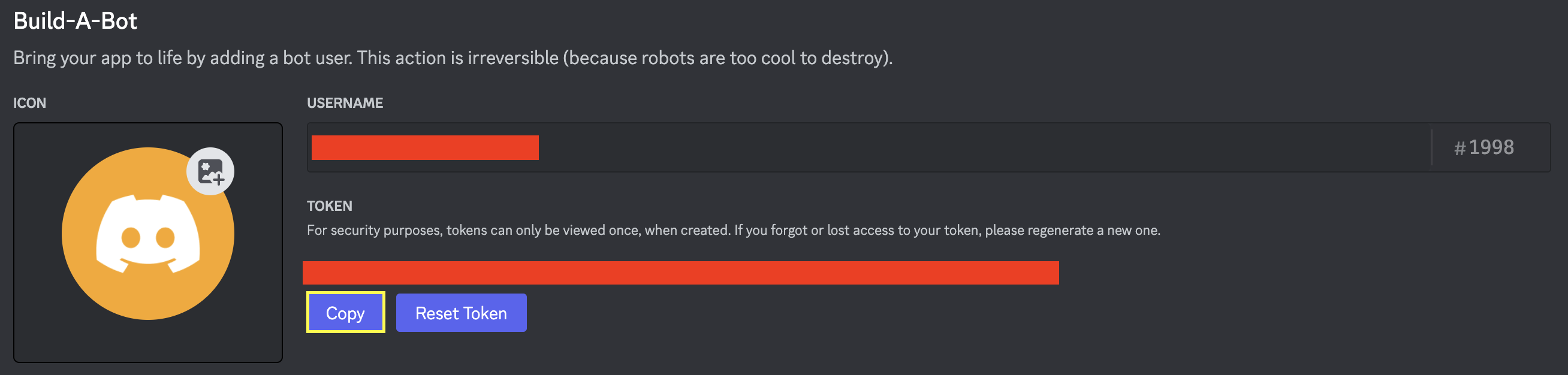
3. Go to the **OAuth2** tab to find your **Client Secret** (`DISCORD_CLIENT_SECRET`).
### Invite the bot to your server
**Required scopes:** `bot`, `applications.commands`
**Required permissions:**
| Category | Permissions |
|----------|---------------------------------------------------------------------------------------------------------------------------------------------------------------------------------------------------------------------------------------|
| General | Manage Roles, Change Nickname, View Channels, Manage Events, Create Events |
| Text | Send Messages, Create Public/Private Threads, Send Messages in Threads, Manage Messages, Manage Threads, Embed Links, Attach Files, Read Message History, Mention Everyone, Use External Emojis/Stickers, Add Reactions, Create Polls |
| Voice | Connect, Speak |
Use this invite URL (replace `